Selling a school course set at the till, and ordering the missing titles
Keep each school's class list, put the whole set on the bill with one key, leave out what the parent already has, and order what is out of stock for them. A walk-through of school course sets in BooksPOS.
In the school season a book depot sells the same lists again and again: Class 5 of one school, Class 7 of another, each with its compulsory books, optional ones and notebooks. Typing twelve items for every parent is slow, and mistakes are easy: the wrong edition, a forgotten notebook, a discount given on things that are not part of the set. School course sets in BooksPOS turn a class list into one step at the till.
1. Keep the class list
On the store PC, open School sets and add the school, then a class list for a session and section, for example Class 5 for 2026-27. For each item, say whether it is:
- compulsory, like the textbooks;
- optional, like a recommended dictionary;
- consumable, like notebooks and covers.
Where a school allows alternatives, such as either of two approved atlases, put them in a choice group: the parent takes one of them.
A list starts as a draft. When it is right, publish it. A published version never changes: if the school changes a book later, that is a new version, and whatever was sold on the old one stays as it was.
2. Put the set on the bill (F6)
At the till, choose the customer (F4) and press School set (F6). Pick the school and class. BooksPOS shows every item on the list, ticked, with whether it is in stock.
- Untick anything the parent does not need, such as a book they already have.
- Add to bill puts the ticked items that are in stock on the bill.
- Add available, order the rest does the same and turns the missing items into an order for that customer.
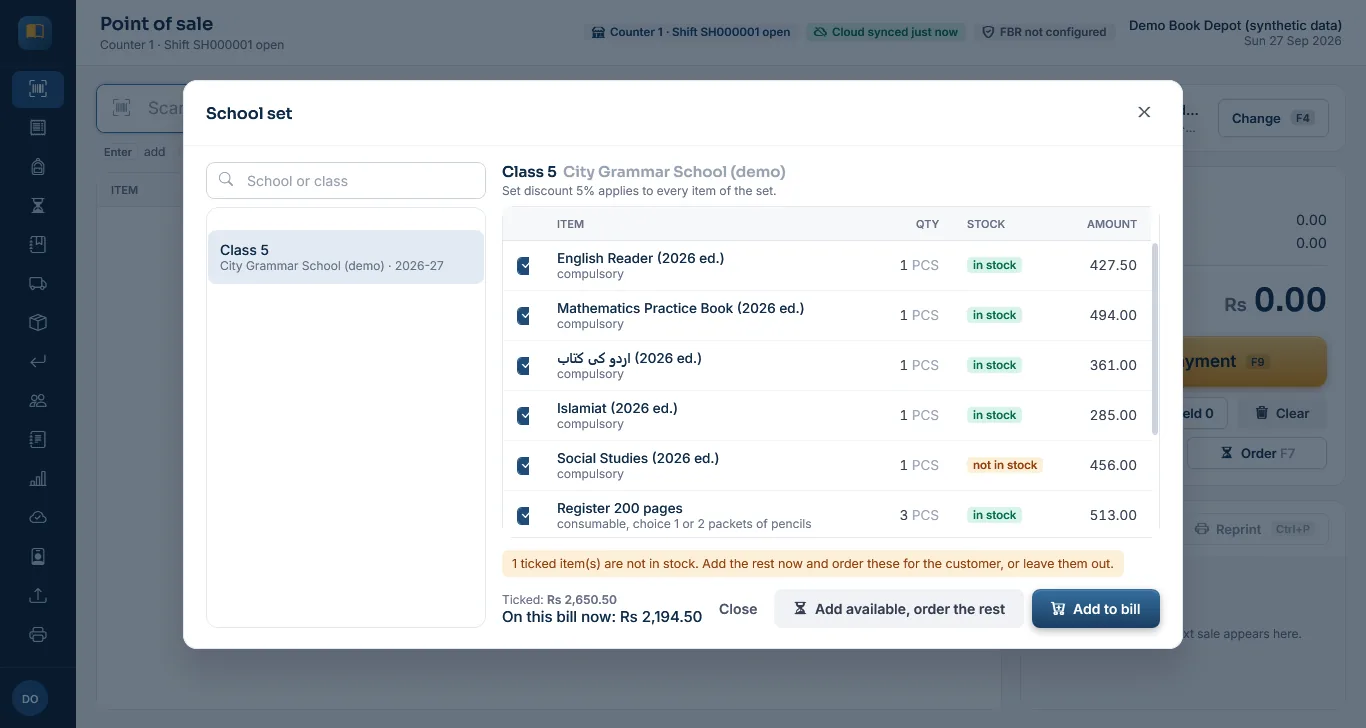
School set (F6) at the till, with one title not in stock. Screenshot of the current build (26 Sep 2026), synthetic demo data.
The set discount applies only to the items that came from the published list. A pen or a bag the parent adds to the same bill is charged at its normal price.
3. The books still owed
Missing items become an order on Pending deliveries. When stock arrives, Reserve what is free holds it for the parent until a hold date (14 days by default), and a walk-in sale cannot take it. When the parent comes back, Hand over makes a normal bill at the agreed price, which can be paid from their advance. Print pending slip gives the parent a list of what is still to collect; it says it is not a bill.
If the parent paid ahead, their money is held as an advance rather than counted as a sale. Taking an advance and using it on the bill.
4. Know what to buy
Each published list has a demand view: for every item, how many were sold, ordered, held, are free on the shelf and are still to buy. Use it to place your purchase order with the publisher on the Purchasing screen; the demand view does not create orders by itself.
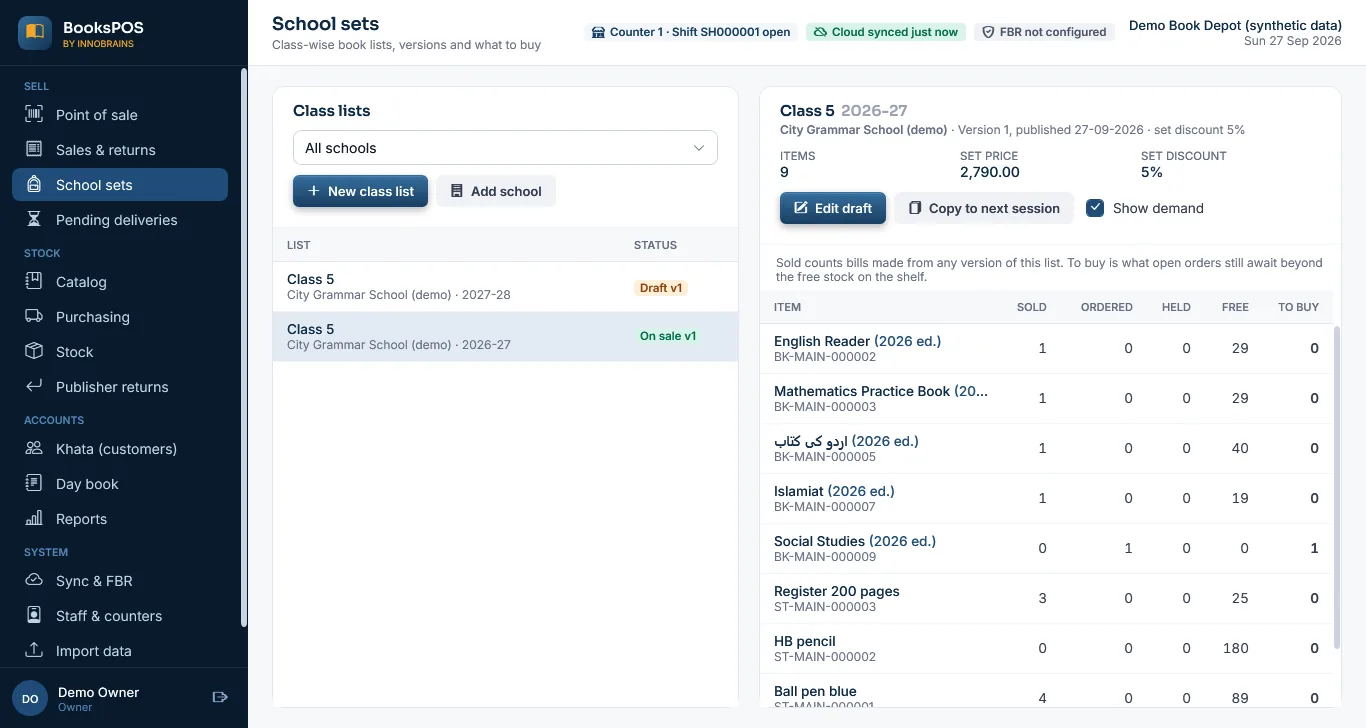
Demand for one class list. Taken before publisher returns were finished, so the menu still marks them "Soon". Screenshot of the current build (26 Sep 2026), synthetic demo data.
5. Next session
Copy a list to the next session. The copy is a draft, and it cannot go live until it is changed, or until its newer editions are reviewed and confirmed. That stops last year's editions going into this year's sets by accident. Keeping book editions apart.
The limits, plainly
- School course sets work in the current build and are covered by automated tests, including a partial set with a substitute and a later pickup. They have not been used in a real shop yet.
- Class lists are made on the store PC. Importing a school's list from a file is not built.
- Class lists, orders and demand are on the store PC; the cloud does not show them.
- The pending slip prints in software, like receipts, and has not been tried on a real printer.
Common questions
Can the set discount apply to the whole bill?
No. It applies only to items added from the published list, so extras on the same bill keep their normal prices.
What if the parent already has one of the books?
Untick it in the School set dialog before adding the set.
What happens when a title is out of stock?
Choose "Add available, order the rest". The missing title becomes an order for that customer and is held for them when stock arrives.
Can I change a list after the season has started?
A published version never changes. Make a new version with the change and publish it; bills made on the old version stay as they were.
Can I import a school's book list from Excel?
Not yet. Lists are made on the store PC; the items themselves can be imported from CSV.
More on the school course sets page.
Founder & CEO, Innobrains Technologies
Arshad Ali is the founder and CEO of Innobrains Technologies, the company that is building BooksPOS: point-of-sale, stock and khata software for book depots and stationers in Pakistan.
Run your book depot on BooksPOS
Billing, editions and ISBNs, school course sets, khata and advances, on the shop's own PC without internet. In development: pilot shops set it up with us.
Related guides
A school-season checklist for book depots
The weeks before schools open decide a book depot's year. A practical checklist for the month before, the rush itself and the weeks after, and where BooksPOS helps at each step.
27 Sep 2026 · 5 minTaking an advance from a parent, and using it on the bill
Record money a parent pays ahead as an advance (not a sale), use it later with the "From advance" tender, and refund what is left, with the drawer and khata staying right.
26 Sep 2026 · 5 minISBN check digits explained, and why a wrong ISBN is refused
The last character of every ISBN is worked out from the others. Here is how the ISBN-10 and ISBN-13 check digits are calculated, how the two forms convert, and why BooksPOS refuses a wrong ISBN instead of guessing.
27 Sep 2026 · 5 min